- Introduction
- Add Default Character Set Filter
- CORS Filter
- CSRF Prevention Filter
- CSRF Prevention Filter for REST APIs
- Expires Filter
- Failed Request Filter
- HTTP Header Security Filter
- Rate Limit Filter
- Remote Address Filter
- Remote Host Filter
- Remote CIDR Filter
- Remote IP Filter
- Introduction
- Filter Class Name
- Basic configuration to handle 'x-forwarded-for'
- Basic configuration to handle 'x-forwarded-for' and 'x-forwarded-proto'
- Advanced configuration with internal proxies
- Advanced configuration with trusted proxies
- Advanced configuration with internal and trusted proxies
- Advanced configuration with an untrusted proxy
- Initialisation parameters
- Request Dumper Filter
- Session Initializer Filter
- Set Character Encoding Filter
- WebDAV Fix Filter


Apache Tomcat 9 Configuration Reference
Version 9.0.109,
Container Provided Filters
Table of Contents
Introduction
Tomcat provides a number of Filters which may be
configured for use with all web applications using
$CATALINA_BASE/conf/web.xml or may be configured for individual
web applications by configuring them in the application's
WEB-INF/web.xml. Each filter is described below.
This description uses the variable name $CATALINA_BASE to refer the base directory against which most relative paths are resolved. If you have not configured Tomcat for multiple instances by setting a CATALINA_BASE directory, then $CATALINA_BASE will be set to the value of $CATALINA_HOME, the directory into which you have installed Tomcat.
Add Default Character Set Filter
Introduction
The HTTP specification is clear that if no character set is specified for media sub-types of the "text" media type, the ISO-8859-1 character set must be used. However, browsers may attempt to auto-detect the character set. This may be exploited by an attacker to perform an XSS attack. Internet Explorer and other browsers have an option to enable this behavior.
This filter prevents the attack by explicitly setting a character set. Unless the provided character set is explicitly overridden by the user the browser will adhere to the explicitly set character set, thus preventing the XSS attack.
Filter Class Name
The filter class name for the Add Default Character Set Filter is
org.apache.catalina.filters.AddDefaultCharsetFilter
.
Initialisation parameters
The Add Default Character Set Filter supports the following initialization parameters:
| Attribute | Description |
|---|---|
encoding |
Name of the character set which should be set, if no other character set
was set explicitly by a Servlet. This parameter has two special values
|
CORS Filter
Introduction
This filter is an implementation of W3C's CORS (Cross-Origin Resource Sharing) specification, which is a mechanism that enables cross-origin requests.
The filter works by adding required Access-Control-* headers
to HttpServletResponse object. The filter also protects against HTTP
response splitting. If request is invalid, or is not permitted, then request
is rejected with HTTP status code 403 (Forbidden). A
flowchart that
demonstrates request processing by this filter is available.
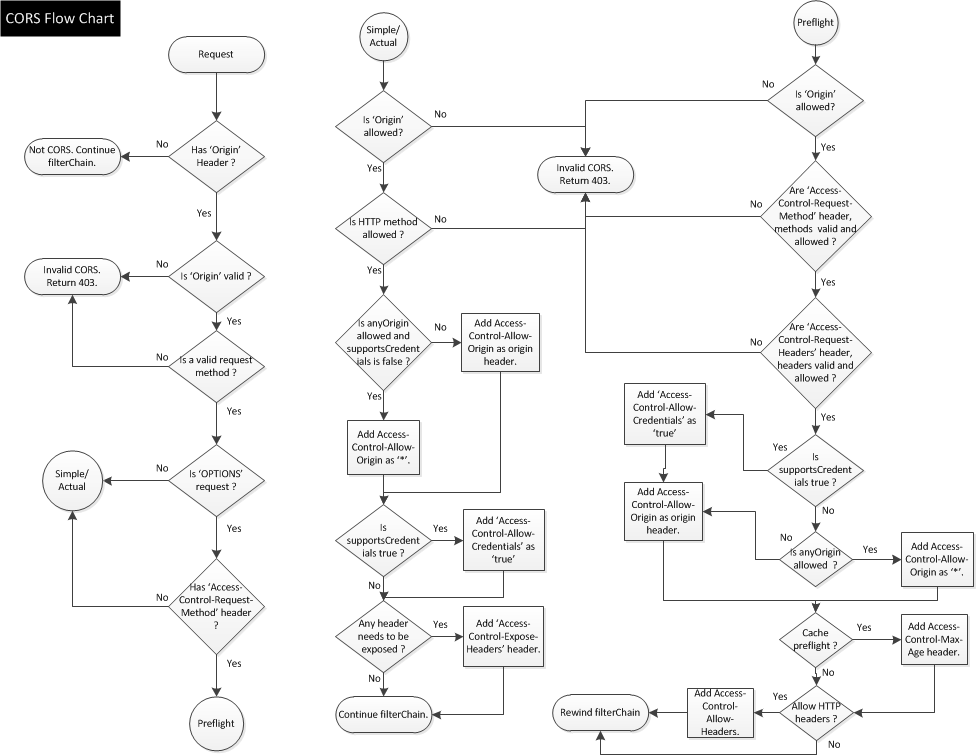
The minimal configuration required to use this filter is:
<filter>
  <filter-name>CorsFilter</filter-name>
  <filter-class>org.apache.catalina.filters.CorsFilter</filter-class>
</filter>
<filter-mapping>
  <filter-name>CorsFilter</filter-name>
  <url-pattern>/*</url-pattern>
</filter-mapping>
The above configuration enables the filter but does not relax the cross-origin policy. As a minimum, you will need to add a cors.allowed.origins initialisation parameter as described below to enable cross-origin requests. Depending on your requirements, you may need to provide additional configuration.
An instance of this filter can only implement one policy. If you want to apply different policies (e.g. different allowed origins) to different URLs or sets of URLs within your web application you will need to configure a separate instance of this filter for each policy you wish to configure.
Filter Class Name
The filter class name for the CORS Filter is
org.apache.catalina.filters.CorsFilter.
Initialisation parameters
The CORS Filter supports following initialisation parameters:
| Attribute | Description |
|---|---|
cors.allowed.origins |
A list of origins
that are allowed to access the resource. A |
cors.allowed.methods |
A comma separated list of HTTP methods that can be used to access the
resource, using cross-origin requests. These are the methods which will
also be included as part of |
cors.allowed.headers |
A comma separated list of request headers that can be used when
making an actual request. These headers will also be returned as part
of |
cors.exposed.headers |
A comma separated list of headers other than simple response headers
that browsers are allowed to access. These are the headers which will
also be included as part of |
cors.preflight.maxage |
The amount of seconds, browser is allowed to cache the result of the
pre-flight request. This will be included as part of
|
cors.support.credentials |
A flag that indicates whether the resource supports user credentials.
This flag is exposed as part of
|
cors.request.decorate |
A flag to control if CORS specific attributes should be added to
HttpServletRequest object or not. Defaults:
|
Here's an example of a more advanced configuration, that overrides defaults:
<filter>
  <filter-name>CorsFilter</filter-name>
  <filter-class>org.apache.catalina.filters.CorsFilter</filter-class>
  <init-param>
    <param-name>cors.allowed.origins</param-name>
    <param-value>https://www.apache.org</param-value>
  </init-param>
  <init-param>
    <param-name>cors.allowed.methods</param-name>
    <param-value>GET,POST,HEAD,OPTIONS,PUT</param-value>
  </init-param>
  <init-param>
    <param-name>cors.allowed.headers</param-name>
    <param-value>Content-Type,X-Requested-With,accept,Origin,Access-Control-Request-Method,Access-Control-Request-Headers</param-value>
  </init-param>
  <init-param>
    <param-name>cors.exposed.headers</param-name>
    <param-value>Access-Control-Allow-Origin,Access-Control-Allow-Credentials</param-value>
  </init-param>
  <init-param>
    <param-name>cors.support.credentials</param-name>
    <param-value>true</param-value>
  </init-param>
  <init-param>
    <param-name>cors.preflight.maxage</param-name>
    <param-value>10</param-value>
  </init-param>
</filter>
<filter-mapping>
  <filter-name>CorsFilter</filter-name>
  <url-pattern>/*</url-pattern>
</filter-mapping>
CORS Filter and HttpServletRequest attributes
CORS Filter adds information about the request, in HttpServletRequest
object, for consumption downstream. Following attributes are set, if
cors.request.decorate initialisation parameter is
true:
- cors.isCorsRequest: Flag to determine if request is a CORS request.
- cors.request.origin: The Origin URL, i.e. the URL of the page from where the request originated.
- cors.request.type: Type of CORS request. Possible
values:
SIMPLE: A request which is not preceded by a pre-flight request.ACTUAL: A request which is preceded by a pre-flight request.PRE_FLIGHT: A pre-flight request.NOT_CORS: A normal same-origin request.INVALID_CORS: A cross-origin request, which is invalid.
- cors.request.headers: Request headers sent as
Access-Control-Request-Headersheader, for a pre-flight request.
CSRF Prevention Filter
Introduction
This filter provides basic CSRF protection for a web application. The
filter assumes that it is mapped to /* and that all URLs
returned to the client are encoded via a call to
HttpServletResponse#encodeRedirectURL(String) or
HttpServletResponse#encodeURL(String).
This filter prevents CSRF by generating a nonce and storing it in the session. URLs are also encoded with the same nonce. When the next request is received the nonce in the request is compared to the nonce in the session and only if they are the same is the request allowed to continue.
Filter Class Name
The filter class name for the CSRF Prevention Filter is
org.apache.catalina.filters.CsrfPreventionFilter
.
Initialisation parameters
The CSRF Prevention Filter supports the following initialisation parameters:
| Attribute | Description |
|---|---|
denyStatus |
HTTP response status code that is used when rejecting denied
request. The default value is |
enforce |
A flag to enable or disable enforcement. When enforcement is disabled, the CsrfPreventionFilter will allow all requests and log CSRF failures as DEBUG messages. The default is true, enabling the enforcement of CSRF protection. |
entryPoints |
A comma separated list of URLs that will not be tested for the presence of a valid nonce. They are used to provide a way to navigate back to a protected application after having navigated away from it. Entry points will be limited to HTTP GET requests and should not trigger any security sensitive actions. |
nonceCacheSize |
The number of previously issued nonces that will be cached on a LRU basis to support parallel requests, limited use of the refresh and back in the browser and similar behaviors that may result in the submission of a previous nonce rather than the current one. If not set, the default value of 5 will be used. |
nonceRequestParameterName |
The name of the request parameter used for the nonce. If not set, the
default value of |
randomClass |
The name of the class to use to generate nonces. The class must be an
instance of |
noNonceURLPatterns |
A list of URL patterns that will not have CSRF nonces added to them. You may not want to add nonces to certain URLs to avoid creating unique URLs which may defeat resource caching, etc. There are several types of patterns supported:
The default is |
CSRF Prevention Filter for REST APIs
Introduction
This filter provides basic CSRF protection for REST APIs. The CSRF
protection is applied only for modifying HTTP requests (different from GET,
HEAD, OPTIONS) to protected resources. It is based on a custom header
X-CSRF-Token that provides a valid nonce.
CSRF protection mechanism for REST APIs consists of the following steps:
- Client asks for a valid nonce. This is performed with a non-modifying "Fetch" request to protected resource.
- Server responds with a valid nonce mapped to the current user session.
- Client provides this nonce in the subsequent modifying requests in the frame of the same user session.
- Server rejects all modifying requests to protected resources that do not contain a valid nonce.
Basic configuration sample
On the server side
- All CSRF protected REST APIs should be protected with an authentication mechanism.
- Protect modifying REST APIs with this filter.
- Provide at least one non-modifying operation.
<filter>
  <filter-name>RestCSRF</filter-name>
  <filter-class>org.apache.catalina.filters.RestCsrfPreventionFilter</filter-class>
</filter>
<filter-mapping>
  <filter-name>RestCSRF</filter-name>
  <!-- Modifying operations -->
  <url-pattern>/resources/removeResource</url-pattern>
  <url-pattern>/resources/addResource</url-pattern>
  <!-- Non-modifying operations -->
  <url-pattern>/resources/listResources</url-pattern>
</filter-mapping>
On the client side
- Make a non-modifying "Fetch" request in order to obtain a valid nonce.
This can be done with sending additional header
X-CSRF-Token: Fetch - Cache the returned session id and nonce in order to provide them in the subsequent modifying requests to protected resources.
- Modifying requests can be denied and header
X-CSRF-Token: Requiredwill be returned in case of invalid or missing nonce, expired session or in case the session id is changed by the server.
Client Request:
GET /rest/resources/listResources HTTP/1.1
X-CSRF-Token: Fetch
Authorization: Basic ...
Host: localhost:8080
...

Server Response:
HTTP/1.1 200 OK
Set-Cookie: JSESSIONID=...; Path=/rest; HttpOnly
X-CSRF-Token: ...
...

Client Request:
POST /rest/resources/addResource HTTP/1.1
Cookie: JSESSIONID=...
X-CSRF-Token: ...
Authorization: Basic ...
Host: localhost:8080
...

Server Response:
HTTP/1.1 200 OK
...
RestCsrfPreventionFilter and HttpServletRequest parameters
When the client is not able to insert custom headers in its calls to REST APIs there is additional capability to configure URLs for which a valid nonce will be accepted as a request parameter.
Note: If there is a X-CSRF-Token header, it will be taken
with preference over any parameter with the same name in the request.
Request parameters cannot be used to fetch new nonce, only header can be
used to request a new nonce.
<filter>
  <filter-name>RestCSRF</filter-name>
  <filter-class>org.apache.catalina.filters.RestCsrfPreventionFilter</filter-class>
  <init-param>
    <param-name>pathsAcceptingParams</param-name>
    <param-value>/resources/removeResource,/resources/addResource</param-value>
  </init-param>
</filter>
<filter-mapping>
  <filter-name>RestCSRF</filter-name>
  <url-pattern>/resources/*</url-pattern>
</filter-mapping>
Filter Class Name
The filter class name for the CSRF Prevention Filter for REST APIs is
org.apache.catalina.filters.RestCsrfPreventionFilter
.
Initialisation parameters
The CSRF Prevention Filter for REST APIs supports the following initialisation parameters:
| Attribute | Description |
|---|---|
denyStatus |
HTTP response status code that is used when rejecting denied
request. The default value is |
pathsAcceptingParams |
A comma separated list of URLs that can accept nonces via request
parameter |
randomClass |
The name of the class to use to generate nonces. The class must be an
instance of |
Expires Filter
Introduction
ExpiresFilter is a Java Servlet API port of Apache
mod_expires.
This filter controls the setting of the Expires HTTP header and the
max-age directive of the Cache-Control HTTP header in
server responses. The expiration date can set to be relative to either the
time the source file was last modified, or to the time of the client access.
These HTTP headers are an instruction to the client about the document's validity and persistence. If cached, the document may be fetched from the cache rather than from the source until this time has passed. After that, the cache copy is considered "expired" and invalid, and a new copy must be obtained from the source.
To modify Cache-Control directives other than max-age (see
RFC
2616 section 14.9), you can use other servlet filters or Apache Httpd
mod_headers module.
Basic configuration sample
Basic configuration to add 'Expires' and 'Cache-Control: max-age='
headers to images, CSS and JavaScript.
<filter>
 <filter-name>ExpiresFilter</filter-name>
 <filter-class>org.apache.catalina.filters.ExpiresFilter</filter-class>
 <init-param>
    <param-name>ExpiresByType image</param-name>
    <param-value>access plus 10 minutes</param-value>
 </init-param>
 <init-param>
    <param-name>ExpiresByType text/css</param-name>
    <param-value>access plus 10 minutes</param-value>
 </init-param>
 <init-param>
    <param-name>ExpiresByType text/javascript</param-name>
    <param-value>access plus 10 minutes</param-value>
 </init-param>
</filter>
...
<filter-mapping>
 <filter-name>ExpiresFilter</filter-name>
 <url-pattern>/*</url-pattern>
 <dispatcher>REQUEST</dispatcher>
</filter-mapping>
Alternate Syntax
The ExpiresDefault and ExpiresByType directives can also be
defined in a more readable syntax of the form:
<init-param>
 <param-name>ExpiresDefault</param-name>
 <param-value><base> [plus] {<num> <type>}*</param-value>
</init-param>

<init-param>
 <param-name>ExpiresByType type</param-name>
 <param-value><base> [plus] {<num> <type>}*</param-value>
</init-param>

<init-param>
 <param-name>ExpiresByType type;encoding</param-name>
 <param-value><base> [plus] {<num> <type>}*</param-value>
</init-param>
where <base> is one of:
accessnow(equivalent to 'access')modification
The plus keyword is optional. <num> should be an
integer value (acceptable to Integer.parseInt()), and
<type> is one of:
year,yearsmonth,monthsweek,weeksday,dayshour,hoursminute,minutessecond,seconds
For example, any of the following directives can be used to make documents expire 1 month after being accessed, by default:
<init-param>
 <param-name>ExpiresDefault</param-name>
 <param-value>access plus 1 month</param-value>
</init-param>

<init-param>
 <param-name>ExpiresDefault</param-name>
 <param-value>access plus 4 weeks</param-value>
</init-param>

<init-param>
 <param-name>ExpiresDefault</param-name>
 <param-value>access plus 30 days</param-value>
</init-param>
The expiry time can be fine-tuned by adding several
'<num> <type>' clauses:
<init-param>
 <param-name>ExpiresByType text/html</param-name>
 <param-value>access plus 1 month 15 days 2 hours</param-value>
</init-param>

<init-param>
 <param-name>ExpiresByType image/gif</param-name>
 <param-value>modification plus 5 hours 3 minutes</param-value>
</init-param>
Note that if you use a modification date based setting, the Expires
header will not be added to content that does not come from
a file on disk. This is due to the fact that there is no modification time
for such content.
Expiration headers generation eligibility
A response is eligible to be enriched by ExpiresFilter if :
- no expiration header is defined (
Expiresheader or themax-agedirective of theCache-Controlheader), - the response status code is not excluded by the directive
ExpiresExcludedResponseStatusCodes, - the
Content-Typeof the response matches one of the types defined the inExpiresByTypedirectives or theExpiresDefaultdirective is defined.
Note : If Cache-Control header contains other directives than
max-age, they are concatenated with the max-age directive
that is added by the ExpiresFilter.
Expiration configuration selection
The expiration configuration if elected according to the following algorithm:
ExpiresByTypematching the exact content-type returned byHttpServletResponse.getContentType()possibly including the charset (e.g. 'text/xml;charset=UTF-8'),ExpiresByTypematching the content-type without the charset ifHttpServletResponse.getContentType()contains a charset (e.g. 'text/xml;charset=UTF-8' -> 'text/xml'),ExpiresByTypematching the major type (e.g. substring before '/') ofHttpServletResponse.getContentType()(e.g. 'text/xml;charset=UTF-8' -> 'text'),ExpiresDefault
Filter Class Name
The filter class name for the Expires Filter is
org.apache.catalina.filters.ExpiresFilter
.
Initialisation parameters
The Expires Filter supports the following initialisation parameters:
| Attribute | Description |
|---|---|
ExpiresExcludedResponseStatusCodes |
This directive defines the http response status codes for which the
This directive is useful to ease usage of See sample below the table |
ExpiresByType <content-type> |
This directive defines the value of the
The base time is either the last modification time of the file, or the time
of the client's access to the document. Which should be used is
specified by the
The difference in effect is subtle. If
Note: When the content type includes a charset (e.g.
See sample below the table
It overrides, for the specified MIME type only, any
expiration date set by the You can also specify the expiration time calculation using an alternate syntax, described earlier in this document. |
ExpiresDefault |
This directive sets the default algorithm for calculating the
expiration time for all documents in the affected realm. It can be
overridden on a type-by-type basis by the |
Sample: exclude response status codes 302, 500 and 503
<init-param>
 <param-name>ExpiresExcludedResponseStatusCodes</param-name>
 <param-value>302, 500, 503</param-value>
</init-param>
Sample for ExpiresByType initialization parameter
<init-param>
   <param-name>ExpiresByType text/html</param-name>
   <param-value>access plus 1 month 15   days 2 hours</param-value>
</init-param>

<init-param>
   <!-- 2592000 seconds = 30 days -->
   <param-name>ExpiresByType image/gif</param-name>
   <param-value>A2592000</param-value>
</init-param>
Troubleshooting
To troubleshoot, enable logging on the
org.apache.catalina.filters.ExpiresFilter.
Extract of logging.properties
org.apache.catalina.filters.ExpiresFilter.level = FINE Sample of initialization log message:
Mar 26, 2010 2:01:41 PM org.apache.catalina.filters.ExpiresFilter init
FINE: Filter initialized with configuration ExpiresFilter[
 excludedResponseStatusCode=[304],
 default=null,
 byType={
    image=ExpiresConfiguration[startingPoint=ACCESS_TIME, duration=[10 MINUTE]],
    text/css=ExpiresConfiguration[startingPoint=ACCESS_TIME, duration=[10 MINUTE]],
    text/javascript=ExpiresConfiguration[startingPoint=ACCESS_TIME, duration=[10 MINUTE]]}]
Sample of per-request log message where ExpiresFilter adds an
expiration date is below. The message is on one line and is wrapped here
for better readability.
Mar 26, 2010 2:09:47 PM org.apache.catalina.filters.ExpiresFilter onBeforeWriteResponseBody
FINE: Request "/tomcat.gif" with response status "200"
 content-type "image/gif", set expiration date 3/26/10 2:19 PM
Sample of per-request log message where ExpiresFilter does not add
an expiration date:
Mar 26, 2010 2:10:27 PM org.apache.catalina.filters.ExpiresFilter onBeforeWriteResponseBody
FINE: Request "/docs/config/manager.html" with response status "200"
 content-type "text/html", no expiration configured
Failed Request Filter
Introduction
This filter triggers parameters parsing in a request and rejects the
request if some parameters were skipped during parameter parsing because
of parsing errors or request size limitations (such as
maxParameterCount attribute in a
Connector).
This filter can be used to ensure that none parameter values submitted by
client are lost.
Note that parameter parsing may consume the body of an HTTP request, so
caution is needed if the servlet protected by this filter uses
request.getInputStream() or request.getReader()
calls. In general the risk of breaking a web application by adding this
filter is not so high, because parameter parsing does check content type
of the request before consuming the request body.
Note, that for the POST requests to be parsed correctly, a
SetCharacterEncodingFilter filter must be configured above
this one. See CharacterEncoding page in the FAQ for details.
The request is rejected with HTTP status code 400 (Bad Request).
Filter Class Name
The filter class name for the Failed Request Filter is
org.apache.catalina.filters.FailedRequestFilter
.
Initialisation parameters
The Failed Request Filter does not support any initialization parameters.
HTTP Header Security Filter
Introduction
There are a number of HTTP headers that can be added to the response to improve the security of the connection. This filter provides a mechanism for adding those headers. Note that security related headers with more complex requirements, like CORS, are implemented as separate Filters.
Filter Class Name
The filter class name for the HTTP Header Security Filter is
org.apache.catalina.filters.HttpHeaderSecurityFilter
.
Initialisation parameters
The HTTP Header Security Filter supports the following initialization parameters:
| Attribute | Description |
|---|---|
hstsEnabled |
Will an HTTP Strict Transport Security (HSTS) header
( |
hstsMaxAgeSeconds |
The max age value that should be used in the HSTS header. Negative
values will be treated as zero. If not specified, the default value of
|
hstsIncludeSubDomains |
Should the includeSubDomains parameter be included in the HSTS
header. If not specified, the default value of |
hstsPreload |
Should the preload parameter be included in the HSTS header. If not
specified, the default value of |
antiClickJackingEnabled |
Should the anti click-jacking header ( |
antiClickJackingOption |
What value should be used for the anticlick-jacking header? Must be
one of |
antiClickJackingUri |
If ALLOW-FROM is used for antiClickJackingOption, what URI should be allowed? If not specified, the default value of an empty string will be used. |
blockContentTypeSniffingEnabled |
Should the header that blocks content type sniffing
( |
xssProtectionEnabled |
Note: This setting is deprecated as support for the HTTP header has been removed from all major browsers. The setting has been removed in Tomcat 11.0.x onwards. Should the header that enables the browser's cross-site scripting
filter protection ( |
Rate Limit Filter
Introduction
The Rate Limit Filter can help mitigate Denial of Service (DoS) and Brute Force attacks by limiting the number of a requests that are allowed from a single IP address within a time window (also referred to as a time bucket), e.g. 300 Requests per 60 seconds.
The filter works by incrementing a counter in a time bucket for each IP address, and if the counter exceeds the allowed limit then further requests from that IP are dropped with a "429 Too many requests" response until the bucket time ends and a new bucket starts.
The RateLimiter implementation can be set via the rateLimitClassName
init param. The default implementation,
org.apache.catalina.util.FastRateLimiter, is optimized for
efficiency and low overhead so it converts some configured values to more
efficient values. For example, a configuration of a 60 seconds time bucket
is converted to 65.536 seconds. That allows for very fast bucket calculation
using bit shift arithmetic. In order to remain true to the user intent, the
configured number of requests is then multiplied by the same ratio, so a
configuration of 100 Requests per 60 seconds, has the real values of 109
Requests per 65 seconds. An alternative implementation,
org.apache.catalina.util.ExactRateLimiter, is intended to
provide a less efficient but more accurate control, whose effective duration
in seconds and number of requests allowed are consist with the configured
values. You can specify a different class as long as it implements the
org.apache.catalina.util.RateLimiter interface.
It is common to set up different restrictions for different URIs. For example, a login page or authentication script is typically expected to get far less requests than the rest of the application, so you can add a filter definition that would allow only 5 requests per 15 seconds and map those URIs to it.
You can set enforce to false
to disable the termination of requests that exceed the allowed limit. Then
your application code can inspect the Request Attribute
org.apache.catalina.filters.RateLimitFilter.Count and decide
how to handle the request based on other information that it has, e.g. allow
more requests to certain users based on roles, etc.
exposeHeaders enables the output of the rate limiter
configuration and state via an HTTP response header as per RateLimit
header fields for HTTP (draft).
WARNING: if Tomcat is behind a reverse proxy then you must make sure that the Rate Limit Filter sees the client IP address, so if for example you are using the Remote IP Filter, then the filter mapping for the Rate Limit Filter must come after the mapping of the Remote IP Filter to ensure that each request has its IP address resolved before the Rate Limit Filter is applied. Failure to do so will count requests from different IPs in the same bucket and will result in a self inflicted DoS attack.
Filter Class Name
The filter class name for the Remote Address Filter is
org.apache.catalina.filters.RateLimitFilter
.
Initialisation parameters
The Rate Limit Filter supports the following initialisation parameters:
| Attribute | Description |
|---|---|
bucketDuration |
The number of seconds in a time bucket. Default is |
bucketRequests |
The number of requests that are allowed in a time bucket.
Default is |
enforce |
Set to false to allow requests through even when they exceed
the maximum allowed per time window. Your application code can
still inspect the Request Attribute
org.apache.catalina.filters.RateLimitFilter.Count to retrieve
the number of Requests made from that IP within the time window.
Default is |
exposeHeaders |
Set to true to expose the configuration and state of the rate limiter
via an HTTP response header as per RateLimit
header fields for HTTP (draft). Default is |
rateLimitClassName |
The full class name of an implementation of the RateLimiter interface. Default is "org.apache.catalina.util.FastRateLimiter", which is optimized for efficiency. If you need exact rate limiting and can accept a small decrease in efficiency, you can use "org.apache.catalina.util.ExactRateLimiter" instead. |
statusCode |
The status code to return when a request is dropped.
Default is |
statusMessage |
The status message to return when a request is dropped. Default is "Too many requests". |
Example
Set the site rate limit to 300 Requests per minute (default):
    <filter>
        <filter-name>RateLimitFilter Global</filter-name>
        <filter-class>org.apache.catalina.filters.RateLimitFilter</filter-class>
    </filter>

    <filter-mapping>
        <filter-name>RateLimitFilter Global</filter-name>
        <url-pattern>*</url-pattern>
    </filter-mapping>
Set the /auth/* scripts rate limit to 20 Requests per minute:
    <filter>
        <filter-name>RateLimitFilter Login</filter-name>
        <filter-class>org.apache.catalina.filters.RateLimitFilter</filter-class>
        <init-param>
            <param-name>bucketRequests</param-name>
            <param-value>20</param-value>
        </init-param>
    </filter>

    <filter-mapping>
        <filter-name>RateLimitFilter Login</filter-name>
        <url-pattern>/auth/*</url-pattern>
    </filter-mapping>
Remote Address Filter
Introduction
The Remote Address Filter allows you to compare the IP address of the client that submitted this request against one or more regular expressions, and either allow the request to continue or refuse to process the request from this client.
The syntax for regular expressions is different than that for
'standard' wildcard matching. Tomcat uses the java.util.regex
package. Please consult the Java documentation for details of the
expressions supported.
Note: There is a caveat when using this filter with
IPv6 addresses. Format of the IP address that this valve is processing
depends on the API that was used to obtain it. If the address was obtained
from Java socket using Inet6Address class, its format will be
x:x:x:x:x:x:x:x. That is, the IP address for localhost
will be 0:0:0:0:0:0:0:1 instead of the more widely used
::1. Consult your access logs for the actual value.
See also: Remote Host Filter.
Filter Class Name
The filter class name for the Remote Address Filter is
org.apache.catalina.filters.RemoteAddrFilter
.
Initialisation parameters
The Remote Address Filter supports the following initialisation parameters:
| Attribute | Description |
|---|---|
allow |
A regular expression (using |
deny |
A regular expression (using |
denyStatus |
HTTP response status code that is used when rejecting denied
request. The default value is |
Example
To allow access only for the clients connecting from localhost:
    <filter>
      <filter-name>Remote Address Filter</filter-name>
      <filter-class>org.apache.catalina.filters.RemoteAddrFilter</filter-class>
      <init-param>
        <param-name>allow</param-name>
        <param-value>127\.\d+\.\d+\.\d+|::1|0:0:0:0:0:0:0:1</param-value>
      </init-param>
    </filter>
    <filter-mapping>
      <filter-name>Remote Address Filter</filter-name>
      <url-pattern>/*</url-pattern>
    </filter-mapping>
Remote Host Filter
Introduction
The Remote Host Filter allows you to compare the hostname of the client that submitted this request against one or more regular expressions, and either allow the request to continue or refuse to process the request from this client.
The syntax for regular expressions is different than that for
'standard' wildcard matching. Tomcat uses the java.util.regex
package. Please consult the Java documentation for details of the
expressions supported.
Note: This filter processes the value returned by
method ServletRequest.getRemoteHost(). To allow the method
to return proper host names, you have to enable "DNS lookups" feature on
a Connector.
See also: Remote Address Filter, HTTP Connector configuration.
Filter Class Name
The filter class name for the Remote Address Filter is
org.apache.catalina.filters.RemoteHostFilter
.
Initialisation parameters
The Remote Host Filter supports the following initialisation parameters:
| Attribute | Description |
|---|---|
allow |
A regular expression (using |
deny |
A regular expression (using |
denyStatus |
HTTP response status code that is used when rejecting denied
request. The default value is |
Remote CIDR Filter
Introduction
The Remote CIDR Filter allows you to compare the IP address of the client that submitted this request against one or more netmasks following the CIDR notation, and either allow the request to continue or refuse to process the request from this client. IPv4 and IPv6 are both fully supported.
This filter mimics Apache httpd's Order,
Allow from and Deny from directives,
with the following limitations:
Orderwill always beallow, deny;- dotted quad notations for netmasks are not supported (that is, you
cannot write
192.168.1.0/255.255.255.0, you must write192.168.1.0/24; - shortcuts, like
10.10., which is equivalent to10.10.0.0/16, are not supported; - as the filter name says, this is a CIDR only filter,
therefore subdomain notations like
.mydomain.comare not supported either.
Some more features of this filter are:
- if you omit the CIDR prefix, this filter becomes a single IP filter;
- unlike the Remote Host Filter,
it can handle IPv6 addresses in condensed form (
::1,fe80::/71, etc).
Filter Class Name
The filter class name for the Remote Address Filter is
org.apache.catalina.filters.RemoteCIDRFilter
.
Initialisation parameters
The Remote CIDR Filter supports the following initialisation parameters:
| Attribute | Description |
|---|---|
allow |
A comma-separated list of IPv4 or IPv6 netmasks or addresses
that the remote client's IP address is matched against.
If this attribute is specified, the remote address MUST match
for this request to be accepted. If this attribute is not specified,
all requests will be accepted UNLESS the remote IP is matched by a
netmask in the |
deny |
A comma-separated list of IPv4 or IPv6 netmasks or addresses
that the remote client's IP address is matched against.
If this attribute is specified, the remote address MUST NOT match
for this request to be accepted. If this attribute is not specified,
request acceptance is governed solely by the |
Example
To allow access only for the clients connecting from localhost and from local network 192.68.0.*:
      <filter>
        <filter-name>Remote CIDR Filter</filter-name>
        <filter-class>org.apache.catalina.filters.RemoteCIDRFilter</filter-class>
        <init-param>
          <param-name>allow</param-name>
          <param-value>127.0.0.1, ::1, 192.68.0.0/24</param-value>
        </init-param>
      </filter>

      <filter-mapping>
        <filter-name>Remote CIDR Filter</filter-name>
        <url-pattern>/*</url-pattern>
      </filter-mapping>
Remote IP Filter
Introduction
Tomcat port of mod_remoteip, this filter replaces the apparent client remote IP address and hostname for the request with the IP address list presented by a proxy or a load balancer via a request headers (e.g. "X-Forwarded-For").
Another feature of this filter is to replace the apparent scheme
(http/https), server port and request.secure with the scheme presented
by a proxy or a load balancer via a request header
(e.g. "X-Forwarded-Proto").
If used in conjunction with Remote Address/Host filters then this filter should be defined first to ensure that the correct client IP address is presented to the Remote Address/Host filters.
Note: By default this filter has no effect on the
values that are written into access log. The original values are restored
when request processing leaves the filter and that always happens earlier
than access logging. To pass the remote address, remote host, server port
and protocol values set by this filter to the access log,
they are put into request attributes. Publishing these values here
is enabled by default, but AccessLogValve should be explicitly
configured to use them. See documentation for
requestAttributesEnabled attribute of
AccessLogValve.
The names of request attributes that are set by this filter and can be used by access logging are the following:
org.apache.catalina.AccessLog.RemoteAddrorg.apache.catalina.AccessLog.RemoteHostorg.apache.catalina.AccessLog.Protocolorg.apache.catalina.AccessLog.ServerPortorg.apache.tomcat.remoteAddr
Filter Class Name
The filter class name for the Remote IP Filter is
org.apache.catalina.filters.RemoteIpFilter
.
Basic configuration to handle 'x-forwarded-for'
The filter will process the x-forwarded-for http header.
      <filter>
        <filter-name>RemoteIpFilter</filter-name>
        <filter-class>org.apache.catalina.filters.RemoteIpFilter</filter-class>
      </filter>

      <filter-mapping>
        <filter-name>RemoteIpFilter</filter-name>
        <url-pattern>/*</url-pattern>
        <dispatcher>REQUEST</dispatcher>
      </filter-mapping>
Basic configuration to handle 'x-forwarded-for' and 'x-forwarded-proto'
The filter will process x-forwarded-for and
x-forwarded-proto http headers. Expected value for the
x-forwarded-proto header in case of SSL connections is
https (case insensitive).
      <filter>
        <filter-name>RemoteIpFilter</filter-name>
        <filter-class>org.apache.catalina.filters.RemoteIpFilter</filter-class>
        <init-param>
          <param-name>protocolHeader</param-name>
          <param-value>x-forwarded-proto</param-value>
        </init-param>
      </filter>

      <filter-mapping>
        <filter-name>RemoteIpFilter</filter-name>
        <url-pattern>/*</url-pattern>
        <dispatcher>REQUEST</dispatcher>
      </filter-mapping>
Advanced configuration with internal proxies
RemoteIpFilter configuration:
     <filter>
       <filter-name>RemoteIpFilter</filter-name>
       <filter-class>org.apache.catalina.filters.RemoteIpFilter</filter-class>
       <init-param>
         <param-name>internalProxies</param-name>
         <param-value>192\.168\.0\.10|192\.168\.0\.11</param-value>
       </init-param>
       <init-param>
         <param-name>remoteIpHeader</param-name>
         <param-value>x-forwarded-for</param-value>
       </init-param>
       <init-param>
         <param-name>remoteIpProxiesHeader</param-name>
         <param-value>x-forwarded-by</param-value>
       </init-param>
       <init-param>
         <param-name>protocolHeader</param-name>
         <param-value>x-forwarded-proto</param-value>
       </init-param>
     </filter>

     <filter-mapping>
       <filter-name>RemoteIpFilter</filter-name>
       <url-pattern>/*</url-pattern>
       <dispatcher>REQUEST</dispatcher>
     </filter-mapping>
Request values:
| Property | Value Before RemoteIpFilter | Value After RemoteIpFilter |
|---|---|---|
| request.remoteAddr | 192.168.0.10 | 140.211.11.130 |
request.header['x-forwarded-for'] |
140.211.11.130, 192.168.0.10 | null |
request.header['x-forwarded-by'] |
null | null |
request.header['x-forwarded-proto'] |
https | https |
| request.scheme | http | https |
| request.secure | false | true |
| request.serverPort | 80 | 443 |
Note : x-forwarded-by header is null because only
internal proxies has been traversed by the request.
x-forwarded-for is null because all the proxies are
trusted or internal.
Advanced configuration with trusted proxies
RemoteIpFilter configuration:
     <filter>
       <filter-name>RemoteIpFilter</filter-name>
       <filter-class>org.apache.catalina.filters.RemoteIpFilter</filter-class>
       <init-param>
         <param-name>internalProxies</param-name>
         <param-value>192\.168\.0\.10|192\.168\.0\.11</param-value>
       </init-param>
       <init-param>
         <param-name>remoteIpHeader</param-name>
         <param-value>x-forwarded-for</param-value>
       </init-param>
       <init-param>
         <param-name>remoteIpProxiesHeader</param-name>
         <param-value>x-forwarded-by</param-value>
       </init-param>
       <init-param>
         <param-name>trustedProxies</param-name>
         <param-value>proxy1|proxy2</param-value>
       </init-param>
     </filter>

     <filter-mapping>
       <filter-name>RemoteIpFilter</filter-name>
       <url-pattern>/*</url-pattern>
       <dispatcher>REQUEST</dispatcher>
     </filter-mapping>
Request values:
| Property | Value Before RemoteIpFilter | Value After RemoteIpFilter |
|---|---|---|
| request.remoteAddr | 192.168.0.10 | 140.211.11.130 |
request.header['x-forwarded-for'] |
140.211.11.130, proxy1, proxy2 | null |
request.header['x-forwarded-by'] |
null | proxy1, proxy2 |
Note : proxy1 and proxy2 are both trusted proxies that
come in x-forwarded-for header, they both are migrated in
x-forwarded-by header. x-forwarded-for is null
because all the proxies are trusted or internal.
Advanced configuration with internal and trusted proxies
RemoteIpFilter configuration:
     <filter>
       <filter-name>RemoteIpFilter</filter-name>
       <filter-class>org.apache.catalina.filters.RemoteIpFilter</filter-class>
       <init-param>
         <param-name>internalProxies</param-name>
         <param-value>192\.168\.0\.10|192\.168\.0\.11</param-value>
       </init-param>
       <init-param>
         <param-name>remoteIpHeader</param-name>
         <param-value>x-forwarded-for</param-value>
       </init-param>
       <init-param>
         <param-name>remoteIpProxiesHeader</param-name>
         <param-value>x-forwarded-by</param-value>
       </init-param>
       <init-param>
         <param-name>trustedProxies</param-name>
         <param-value>proxy1|proxy2</param-value>
       </init-param>
     </filter>

     <filter-mapping>
       <filter-name>RemoteIpFilter</filter-name>
       <url-pattern>/*</url-pattern>
       <dispatcher>REQUEST</dispatcher>
     </filter-mapping>
Request values:
| Property | Value Before RemoteIpFilter | Value After RemoteIpFilter |
|---|---|---|
| request.remoteAddr | 192.168.0.10 | 140.211.11.130 |
request.header['x-forwarded-for'] |
140.211.11.130, proxy1, proxy2, 192.168.0.10 | null |
request.header['x-forwarded-by'] |
null | proxy1, proxy2 |
Note : proxy1 and proxy2 are both trusted proxies that
come in x-forwarded-for header, they both are migrated in
x-forwarded-by header. As 192.168.0.10 is an internal
proxy, it does not appear in x-forwarded-by.
x-forwarded-for is null because all the proxies are
trusted or internal.
Advanced configuration with an untrusted proxy
RemoteIpFilter configuration:
     <filter>
       <filter-name>RemoteIpFilter</filter-name>
       <filter-class>org.apache.catalina.filters.RemoteIpFilter</filter-class>
       <init-param>
         <param-name>internalProxies</param-name>
         <param-value>192\.168\.0\.10|192\.168\.0\.11</param-value>
       </init-param>
       <init-param>
         <param-name>remoteIpHeader</param-name>
         <param-value>x-forwarded-for</param-value>
       </init-param>
       <init-param>
         <param-name>remoteIpProxiesHeader</param-name>
         <param-value>x-forwarded-by</param-value>
       </init-param>
       <init-param>
         <param-name>trustedProxies</param-name>
         <param-value>proxy1|proxy2</param-value>
       </init-param>
     </filter>

     <filter-mapping>
       <filter-name>RemoteIpFilter</filter-name>
       <url-pattern>/*</url-pattern>
       <dispatcher>REQUEST</dispatcher>
     </filter-mapping>
Request values:
| Property | Value Before RemoteIpFilter | Value After RemoteIpFilter |
|---|---|---|
| request.remoteAddr | 192.168.0.10 | untrusted-proxy |
request.header['x-forwarded-for'] |
140.211.11.130, untrusted-proxy, proxy1 | 140.211.11.130 |
request.header['x-forwarded-by'] |
null | proxy1 |
Note : x-forwarded-by holds the trusted proxy proxy1.
x-forwarded-by holds 140.211.11.130 because
untrusted-proxy is not trusted and thus, we cannot trust that
untrusted-proxy is the actual remote ip.
request.remoteAddr is untrusted-proxy that is an IP
verified by proxy1.
Initialisation parameters
The Remote IP Filter supports the following initialisation parameters:
| Attribute | Description |
|---|---|
enableLookups |
Should a DNS lookup be performed to provide a host name when calling
|
remoteIpHeader |
Name of the HTTP Header read by this valve that holds the list of
traversed IP addresses starting from the requesting client. If not
specified, the default of |
internalProxies |
Regular expression (using |
proxiesHeader |
Name of the HTTP header created by this valve to hold the list of
proxies that have been processed in the incoming
remoteIpHeader. If not specified, the default of
|
requestAttributesEnabled |
Set to |
trustedProxies |
Regular expression (using |
protocolHeader |
Name of the HTTP Header read by this valve that holds the protocol
used by the client to connect to the proxy. If not specified, the
default of |
hostHeader |
Name of the HTTP Header read by this valve that holds the host
used by the client to connect to the proxy. If not specified, the
default of |
portHeader |
Name of the HTTP Header read by this valve that holds the port
used by the client to connect to the proxy. If not specified, the
default of |
protocolHeaderHttpsValue |
Value of the protocolHeader to indicate that it is
an HTTPS request. If not specified, the default of |
httpServerPort |
Value returned by |
httpsServerPort |
Value returned by |
changeLocalName |
If |
changeLocalPort |
If |
Request Dumper Filter
Introduction
The Request Dumper Filter logs information from the request and response
objects and is intended to be used for debugging purposes. When using this
Filter, it is recommended that the
org.apache.catalina.filter.RequestDumperFilter logger is
directed to a dedicated file and that the
org.apache.juli.VerbatimFormatter is used.
WARNING: Using this filter has side-effects. The
output from this filter includes any parameters included with the request.
The parameters will be decoded using the default platform encoding. Any
subsequent calls to request.setCharacterEncoding() within
the web application will have no effect.
Filter Class Name
The filter class name for the Request Dumper Filter is
org.apache.catalina.filters.RequestDumperFilter
.
Initialisation parameters
The Request Dumper Filter does not support any initialization parameters.
Sample Configuration
The following entries in a web application's web.xml would enable the
Request Dumper filter for all requests for that web application. If the
entries were added to CATALINA_BASE/conf/web.xml, the Request
Dumper Filter would be enabled for all web applications.
<filter>
    <filter-name>requestdumper</filter-name>
    <filter-class>
        org.apache.catalina.filters.RequestDumperFilter
    </filter-class>
</filter>
<filter-mapping>
    <filter-name>requestdumper</filter-name>
    <url-pattern>*</url-pattern>
</filter-mapping>
The following entries in CATALINA_BASE/conf/logging.properties would create a separate log file for the Request Dumper Filter output.
# To this configuration below, 1request-dumper.org.apache.juli.FileHandler
# also needs to be added to the handlers property near the top of the file
1request-dumper.org.apache.juli.FileHandler.level = INFO
1request-dumper.org.apache.juli.FileHandler.directory = ${catalina.base}/logs
1request-dumper.org.apache.juli.FileHandler.prefix = request-dumper.
1request-dumper.org.apache.juli.FileHandler.encoding = UTF-8
1request-dumper.org.apache.juli.FileHandler.formatter = org.apache.juli.VerbatimFormatter
org.apache.catalina.filters.RequestDumperFilter.level = INFO
org.apache.catalina.filters.RequestDumperFilter.handlers = \
  1request-dumper.org.apache.juli.FileHandler
Session Initializer Filter
Introduction
The Session Initializer Filter initializes the jakarta.servlet.http.HttpSession
before the Request is processed. This is required for JSR-356 compliant WebSocket implementations,
if the HttpSession is needed during the HandShake phase.
The Java API for WebSocket does not mandate that an HttpSession would
be initialized upon request, and thus jakarta.servlet.http.HttpServletRequest's
getSession() returns null if the HttpSession was not
initialized in advance.
This filter solves that problem by initializing the HttpSession for any HttpServletRequest
that matches its url-pattern.
Filter Class Name
The filter class name for the Session Initializer Filter is
org.apache.catalina.filters.SessionInitializerFilter.
Initialisation parameters
The Session Initializer Filter does not support any initialization parameters.
Sample Configuration
The following entries in the Web Application Deployment Descriptor, web.xml, would enable the Session Initializer Filter for requests that match the given URL pattern (in this example, "/ws/*").
<filter>
    <filter-name>SessionInitializer</filter-name>
    <filter-class>org.apache.catalina.filters.SessionInitializerFilter</filter-class>
</filter>
<filter-mapping>
    <filter-name>SessionInitializer</filter-name>
    <url-pattern>/ws/*</url-pattern>
</filter-mapping>
Set Character Encoding Filter
Introduction
User agents don't always include character encoding information in
requests. Depending on the how the request is processed, usually the
default encoding of ISO-8859-1 is used. This is not always
desirable. This filter provides options for setting that encoding or
forcing it to a particular value. Essentially this filter calls
ServletRequest.setCharacterEncoding() method.
Effectively the value set by this filter is used when parsing parameters in a POST request, if parameter parsing occurs later than this filter. Thus the order of filter mappings is important. Note that the encoding for GET requests is not set here, but on a Connector. See CharacterEncoding page in the FAQ for details.
Filter Class Name
The filter class name for the Set Character Encoding Filter is
org.apache.catalina.filters.SetCharacterEncodingFilter
.
Initialisation parameters
The Set Character Encoding Filter supports the following initialization parameters:
| Attribute | Description |
|---|---|
encoding |
Name of the character encoding which should be set. |
ignore |
Determines if any character encoding specified by the user agent is
ignored. If this attribute is |
WebDAV Fix Filter
Introduction
This filter was written for Windows NT era Microsoft operating systems that shipped with WebDAV clients that were not compliant with the RFC. This filter is no longer required for current WebDAV clients provided by current (Windows 10 / Windows Server 2012 onwards) Windows operating systems. It has been deprecated and will be removed in Tomcat 11 onwards.
Filter Class Name
The filter class name for the WebDAV Fix Filter is
org.apache.catalina.filters.WebdavFixFilter
.
Initialisation parameters
The WebDAV Fix Filter does not support any initialization parameters.